Trusted Identity Claim Verification
This document describes how to use the ID&V API for submitting trusted identity claims by using the OpenID Connect capabilities. The submitted trusted identity claims are used to upgrade the level of confidence of an identity that has been submitted.
Requirements
To enable trusted identity claims as part of an ID proofing process, a client application needs:
-
API Keys and URLs to access the ID proofing service
-
GIPS-RS key for Back-end to Back-end communication
-
GIPS-UA key for the end-user-facing application to the ID Proofing Back-end communication
-
To register with a trusted Identity Provider known by ID&V such as the IDEMIA Identity Server
-
To implement the OpenID Connect protocol with this Identity Provider
-
To enable the end-user to authenticate and provide their consent to share their identity attributes thanks to the Mobile ID Application.
Here is the documentation that describes this:
Scenarios
The OpenID Connect capabilities is used for submitting a trusted identity claim, which is combined with the ID proofing service to increase the level of confidence of an identity that's been submitted.
The OpenID connect protocol is possible in the following scenarios:
-
The User Agent performs the online authentication request
-
The Relying Party performs the online authentication request
The User Agent performs the online authentication request
Steps Overview
- Create the identity.
- Submit a trusted identity claim request.
- Online authentication The User Agent sends the online authentication and the end-user consents for attribute sharing.
- Retrieve the trusted identity claim.
- Submit an identity document capture.
- Retrieve the identity claim verification and identity proof results.
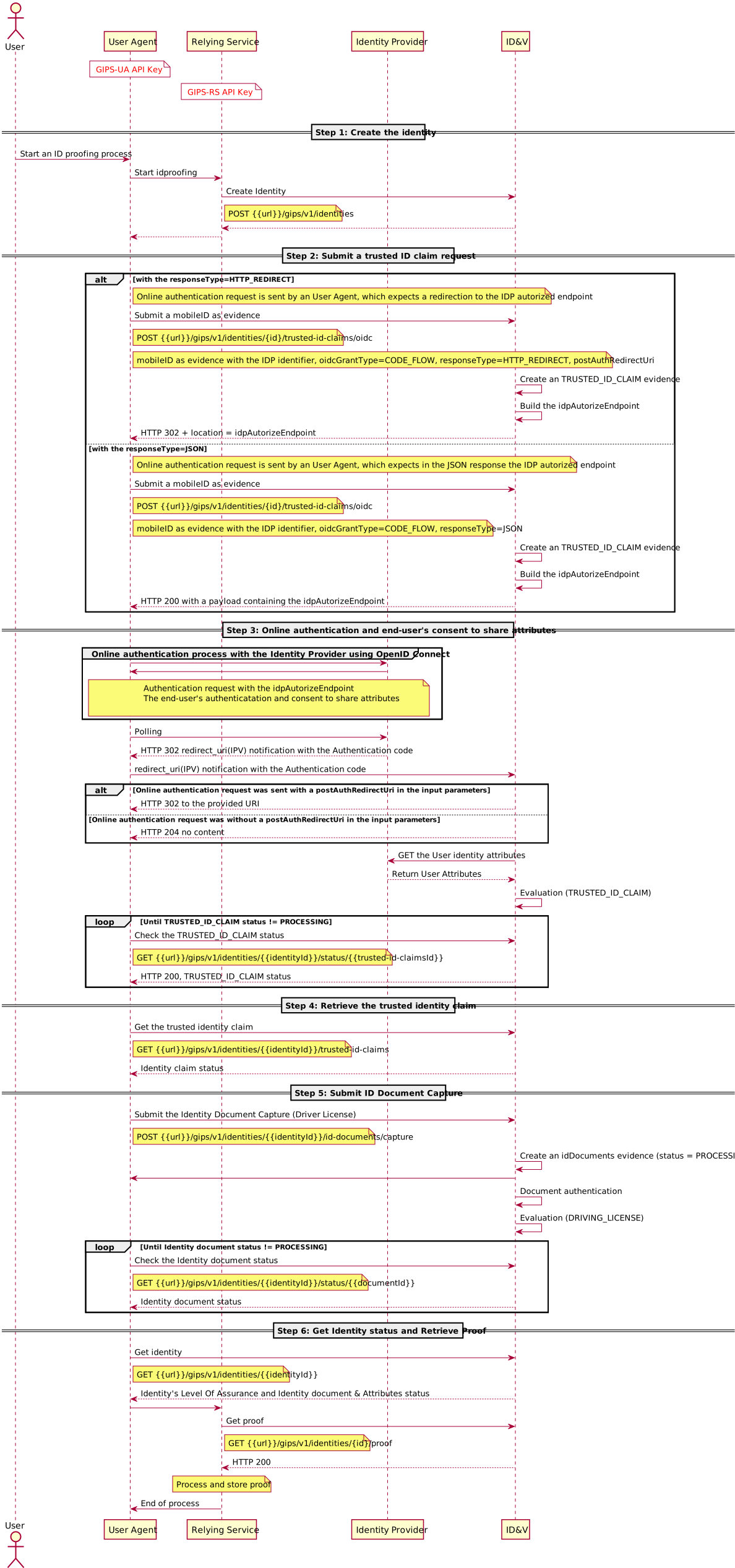
Steps for the User Agent to perform the online authentication request
Step 1: Create the identity.
Create an identity on the ID proofing server that will receive all of the data and gather the verification results related to this identity.
Step 2: Submit a trusted identity claim request.
The client application sends a request to submit the trusted identity claim of an individual.
The service creates a TRUSTED_ID_CLAIM evidence in the identity and returns the authorization endpoint of the Identity Provider, where the client application should authenticate itself and the end-user.
Step 3: Online authentication is obtained and the end-user consents to share attributes.
The following step is completed between the client application and the Identity Provider.
-
The client application obtains the Identity Provider's endpoint from the Service and sends an authentication request to the Identity Provider.
-
The Identity Provider responds with a redirection to a login page in the client application.
-
The end-user authenticates and consents to share attributes.
-
At the end the ID&V service receives a notification once the end-user information has been shared between the client application and the Identity Provider.
Step 4: Retrieve the trusted identity claim.
ID&V retrieves the end-user's attributes shared by the Identity Provider and enhances the identity verification.
Step 5: Submit the identity document capture.
Send the identity document images for verification.
- ID&V performs the document authentication and extracts the end-user’s personally identifiable information (PII) and document information. If the ID document (ID) is valid, its status becomes
VERIFIEDand the ID is assigned a score depending on the number and quality of verifications that have been performed (for example,LEVEL2).
Step 6: Get the identity status and retrieve the proof.
The client application has the capability to check the status of the identity and see which Level of Assurance (LOA) has been achieved.
The end-user can submit additional pieces of evidences to increase the Level of Assurance in the identity claim being presented. Once the client application has reached the end of the process, it can close the transaction by retrieving the proof file that contains all of the identity verification details.
The Relying Party performs the online authentication request
Steps Overview
- Create the identity.
- Submit a trusted identity claim request.
- Online authentication The User Agent sends the online authentication and the end-user consents for attribute sharing.
- Retrieve the trusted identity claim.
- Submit an identity document capture.
- Retrieve the identity claim verification and identity proof results.
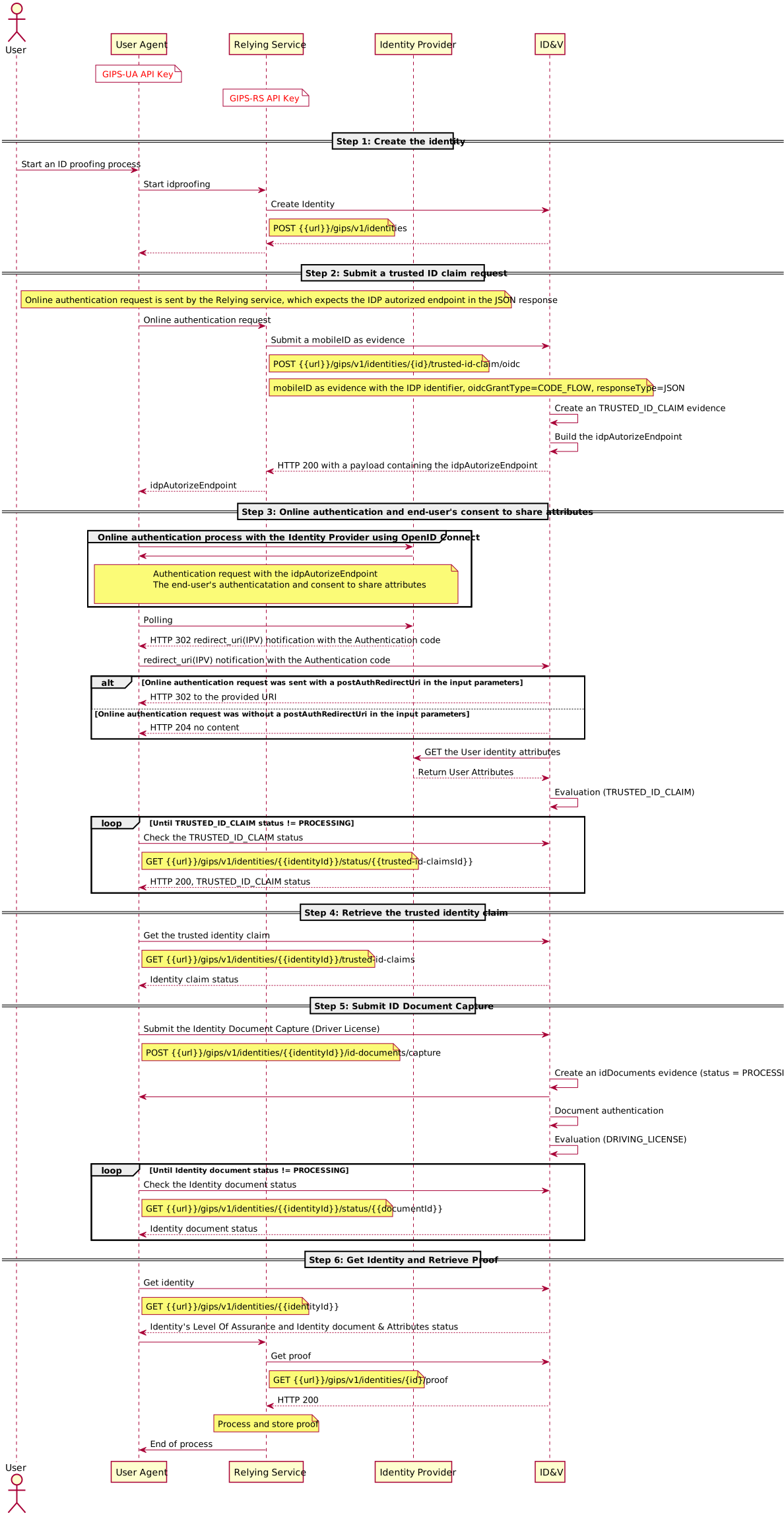
Steps for the Relying Party to perform the online authentication request
Step 1: Create the identity.
Create an identity on the ID proofing server that will receive all of the data and gather the verification results related to this identity.
Step 2: Submit a trusted identity claim request.
The client application obtains a request to submit the trusted identity claim of an individual.
The service creates a TRUSTED_ID_CLAIM evidence in the identity and returns the authorization endpoint of the Identity Provider, where the client application should authenticate itself and the end-user.
Step 3: Online authentication is obtained and the end-user consents to share attributes.
The following step is completed between the client application and the Identity provider.
-
The client application obtains the Identity Provider's endpoint from the service and sends an authentication request to the Identity Provider.
-
The Identity Provider responds with a redirection to a login page in the client application.
-
Then end-user authenticates and consents to share attributes.
At the end the ID&V service receives a notification once the end-user information has been shared between the client application and the Identity Provider.
Step 4: Retrieve the trusted identity claim.
ID&V retrieves the end-user's attributes shared by the Identity Provider and enriches the identity verification.
Step 5: Submit the identity document capture.
Send the identity document images for verification.
- ID&V performs the document authentication and extracts the end-user’s personally identifiable information (PII) and document information. If the ID document is valid, its status becomes
VERIFIEDand the ID is assigned a score depending on the number and quality of verifications that have been performed (for example,LEVEL2).
Step 6: Get the identity status and retrieve the proof.
The client application has the capability to check the status of the identity and see which Level of Assurance (LOA) has been achieved.
The end-user can submit additional pieces of evidences to increase the Level of Assurance in the identity claim being presented. Once the client application has reached the end of the process, it can close the transaction by retrieving the proof file that contains all of the identity verification details.
Web Service Calls
There are many ways to implement the appropriate web service requests depending on your programming language.
For the sake of clarity, the request examples use the cURL tool syntax.
The variables used in the request URLs are:
Variable | Meaning |
|---|---|
| URL_MAIN_PART | The ID&V domain. |
| APIKEY_VALUE | Client application API key as provided by portal administrator(s). |
| IDENTITY_ID | The value obtained after performing Step 1 below. This should be the id value from the Create Identity response message. |
Create an Identity
This request initiates the verification process with ID&V.
The request looks like this:
Shell1curl -X POST https://[URL_MAIN_PART]/gips/v1/identities \2 -H 'Content-Type: multipart/form-data' \3 -H 'apikey: [APIKEY_VALUE]'
When this request is sent, the ID&V response contains an id field.
The value of that field replaces IDENTITY_ID in subsequent requests.
Sample response:
JSON1{2 "id": "gips-3096bbe8-ac24-4e2b-bd35-bd334714c3ec",3 "status": "EXPECTING_INPUT",4 "levelOfAssurance": "LOA0",5 "creationDateTime": "2020-11-18T23:58:35.9240009",6 "evaluationDateTime": "2020-11-18T23:58:37.5227263",7 "upgradePaths": {}8}
Variable | Description |
|---|---|
| id | The identity ID that will be used to identify the current transaction in subsequent requests. |
| status | Status of the transaction |
| levelOfAssurance (LOA) | The current Level of trust for that identity |
| creationDateTime | Identity creation date |
| evaluationDateTime | The date at which the identity was last evaluated |
| upgradePaths | List of possible submissions that would increase LOA |
Submission of the end-user's trusted identity claim request
With this request, the client application can request for sharing the end-user's trust identity claim.
The request looks like this:
Shell1curl -X POST \2 https://[URL_MAIN_PART]/gips/v1/identities/[IDENTITY_ID]/trusted-id-claim/oidc \3 -H 'Content-Type: application/json' \4 -H 'apikey: [APIKEY_VALUE] \5 -d '{6 "idpIdentifier": "MIDSERVER",7 "oidcGrantType": "authorization_code",8 "responseType": "JSON",9 "postAuthRedirectUri": "https://client.redirecturi.com"10 }'
Description of JSON fields in the payload:
Variable | Description |
|---|---|
| idpIdentifier | Contains the Identity Provider identifier |
| oidcGrantType | Contains the OpenID Connect's grant type. Supported value is CODE_FLOW |
| postAuthRedirectUri | Contains the redirection URI at the end of the authentication process when ID&V receives the callback with the authentication code. In case there is a postAuthRedirectUri sent in the request, the response when receiving the callback with the authentication code is HTTP 302 with the redirection URI. In case there is no postAuthRedirectUri sent in the request, the response when receiving the callback with the authentication code is HTTP 201 with no content |
| responseType | Contains the response type expected by the client application. Enum: allowed value HTTP_REDIRECT or JSON. In case there is the responseType = HTTP_REDIRECT , then the client response is HTTP 302 + location = idpAutorizeEndpoint. In case there is not a responseType in the input parameter or the responseType = JSON, then the client response is HTTP 200 with a payload containing the idpAutorizeEndpoint. |
| userIdentifier | Contains the end-user identifier used as login for online authentication against the Identity Provider. |
Sample response:
JSON1{2 "status": "PROCESSING",3 "type": "TRUSTED_ID_CLAIM",4 "id": "5e836c69-c029-45eb-bb2c-c307b708e407",5 "idpAuthorizeEndpoint": "http://localhost:1234/oidc/authorize?response_type=code&scope=openid+id_basic&client_id=@!0000F.6666.9999.5EEE!0001!55CC.EEEE!0008!A7DF.BDBF.82E3.C5C7&nonce=-6507833779997594016&acr_values=loa-2&redirect_uri=http://127.0.0.1:8080/gips/rest/callback/oidc/authorization-granted&state=Z2lwcy0zMDk2YmJlOC1hYzI0LTRlMmItYmQzNS1iZDMzNDcxNGMzZWM7NWU4MzZjNjktYzAyOS00NWViLWJiMmMtYzMwN2I3MDhlNDA3"6}
Variable | Description |
|---|---|
| id | The evidence identifier. |
| status | Evidence status. |
| type | The evidence type. |
| idpAuthorizeEndpoint | The Identity Provider authorize endpoint, which contains the following data |
| location | Contains the OpenID Connect's authorize request parameters. |
| scope | Contains the OpenID Connect scope value. |
| client_id | This is the unique identifier provided by the Onboarding Party during Relying Party enrollment. This as the Relying Party's "username". |
| nonce | This string value used to associate a client session with an ID Token and to mitigate replay attacks. The value is passed through unmodified from the Authentication Request to the ID Token. Sufficient entropy MUST be present in the nonce values used to prevent attackers from guessing the values. |
| acr_values | This parameter controls the authentication methods that the end-user is required to perform during the authentication process. |
| redirect_uri | The ID&V's redirection URI where the authorization code is sent. |
| state | This is a secure random identifier associated with a single User Agent's authorization/authentication session. This opaque value is used to maintain the state between the request and the callback. Typically, Cross-Site Request Forgery (CSRF, XSRF) mitigation is done by cryptographically binding the value of this parameter with a browser cookie. |
Check the status of the end-user's trusted identity claim
With this request, the client application can check the processing status of the end-user's claim identity and see what Level of Assurance (LOA) has been reached.
The request looks like this:
Shell1curl -X GET \2 https://[URL_MAIN_PART]/gips/v1/identities/[IDENTITY_ID]/trusted-id-claims \3 -H 'Content-Type: application/json' \4 -H 'apikey: [APIKEY_VALUE]'
Sample response:
JSON1{2 "globalStatus": {3 "id": "gips-3096bbe8-ac24-4e2b-bd35-bd334714c3ec",4 "status": "EXPECTING_INPUT",5 "levelOfAssurance": "LOA1",6 "creationDateTime": "2020-11-18T23:58:35.9240009",7 "evaluationDateTime": "2020-11-19T00:03:38.8673054",8 "nameReferenceEvidenceId": "5e836c69-c029-45eb-bb2c-c307b708e407",9 "upgradePaths": {}10 },11 "trustedIdClaim": {12 "evidenceId": "5e836c69-c029-45eb-bb2c-c307b708e407",13 "submitDateTime": "2020-11-19T00:00:43.8451989",14 "type": "TRUSTED_ID_CLAIM",15 "evidenceStatus": {16 "evaluationDateTime": "2020-11-19T00:03:38.8673054",17 "status": "VERIFIED",18 "strength": "LEVEL3",19 "score": "LEVEL3",20 "isAdjudicable": false21 },22 "idpIdentifier": "MIDSERVER",23 "oidcGrantType": "authorization_code",24 "portraitReferenceId": "44406fb1-9079-47db-8080-104f6c3b8839",25 "trustedIdClaimData": {26 "idDocumentType": "DRIVING_LICENSE",27 "idDocumentNumber": "Q88705989",28 "issuingDate": "2013-01-10",29 "expiryDate": "2028-02-01",30 "personalAttributes": {31 "givenNames": [32 {33 "value": "CHRISTOPHE",34 "verified": true35 }36 ],37 "surname": {38 "value": "ULYSSE",39 "verified": true40 },41 "dateOfBirth": {42 "value": "1960-04-10",43 "verified": true44 },45 "gender": {46 "value": "M",47 "verified": true48 }49 },50 "address": {51 "streetDetails": {52 "streetLines": ["8840 w russell road"],53 "verified": true54 },55 "postcode": "85001",56 "city": "MINNEAPOLIS",57 "country": "USA",58 "verified": true59 }60 }61 }62}
Values for status can be:
-
VERIFIED- means that evidence has successfully been verified. When VERIFIED, an identity claim is scored on LEVEL 3. -
INVALID- means that the evidence is considered invalid after the checks are performed. -
NOT_VERIFIED- means that the evidence was processed, but not enough checks were performed to make a decision. -
PROCESSING- means that the evidence is currently being processed by the service.
Check the status of the identity submitted
With this request, the client application can check the status of the identity and see what Level of assurance (LOA) has been reached.
The request looks like this:
Shell1curl -X GET \2https://[URL_MAIN_PART]/gips/v1/identities/[IDENTITY_ID] \3-H 'Content-Type: application/json' \4 -H 'apikey: [APIKEY_VALUE]'
Sample response:
JSON1{2 "globalStatus": {3 "id": "gips-3096bbe8-ac24-4e2b-bd35-bd334714c3ec",4 "status": "EXPECTING_INPUT",5 "levelOfAssurance": "LOA1",6 "creationDateTime": "2020-11-18T23:58:35.9240009",7 "evaluationDateTime": "2020-11-19T00:06:26.416222",8 "nameReferenceEvidenceId": "5e836c69-c029-45eb-bb2c-c307b708e407",9 "upgradePaths": {}10 },11 "attributes": [12 {13 "evidenceId": "6c3531c2-fc98-4f04-9d9e-f6fec07fbb0f",14 "submitDateTime": "2020-11-19T00:03:38.8284114",15 "type": "ATTRIBUTES",16 "evidenceStatus": {17 "evaluationDateTime": "2020-11-19T00:06:26.416222",18 "status": "VERIFIED",19 "strength": "LEVEL5",20 "score": "LEVEL3",21 "isAdjudicable": false22 },23 "attributesData": {24 "givenNames": [25 {26 "value": "CHRISTOPHE",27 "verified": true28 }29 ],30 "surname": {31 "value": "ULYSSE",32 "verified": true33 },34 "dateOfBirth": {35 "value": "1960-04-10",36 "verified": true37 },38 "gender": {39 "value": "M",40 "verified": true41 }42 }43 }44 ],45 "addresses": [46 {47 "evidenceId": "1f39161b-72d2-4aa7-9cdd-696da9fd1aef",48 "submitDateTime": "2020-11-19T00:00:43.8451999",49 "type": "ADDRESS",50 "evidenceStatus": {51 "evaluationDateTime": "2020-11-19T00:06:26.416222",52 "status": "VERIFIED",53 "strength": "LEVEL5",54 "score": "LEVEL3",55 "isAdjudicable": false56 },57 "referenceIds": ["5e836c69-c029-45eb-bb2c-c307b708e407"],58 "addressData": {59 "streetDetails": {60 "streetLines": ["8840 w russell road"],61 "verified": true62 },63 "postcode": "85001",64 "city": "MINNEAPOLIS",65 "country": "USA",66 "verified": true67 }68 },69 {70 "evidenceId": "6f8f6750-c4f1-49ed-9459-f4987bc64e34",71 "submitDateTime": "2020-11-19T00:06:24.6170472",72 "type": "ADDRESS",73 "evidenceStatus": {74 "evaluationDateTime": "2020-11-19T00:06:26.416222",75 "status": "NOT_VERIFIED",76 "strength": "LEVEL5",77 "score": "LEVEL0",78 "isAdjudicable": false79 },80 "referenceIds": ["62333961-8885-48bc-99a5-71caad2cbdd9"],81 "addressData": {82 "streetDetails": {83 "streetLines": ["12 COTTONWOOD RD", "SUITE 1001"],84 "verified": true85 },86 "postcode": "12345",87 "city": "EMPIRE",88 "state": "NV",89 "country": "USA",90 "verified": true91 }92 }93 ],94 "idDocuments": [95 {96 "evidenceId": "62333961-8885-48bc-99a5-71caad2cbdd9",97 "submitDateTime": "2020-11-19T00:06:24.6170462",98 "type": "DRIVING_LICENSE",99 "evidenceStatus": {100 "evaluationDateTime": "2020-11-19T00:06:26.416222",101 "status": "INVALID",102 "strength": "LEVEL3",103 "score": "LEVEL0",104 "isAdjudicable": false,105 "errors": [106 {107 "code": "1131",108 "message": "Identity attributes don't match with evidences"109 }110 ],111 "positiveIndicators": [112 "DOC_EXPIRATION_DATE_OK",113 "ISSUING_DATE_VALIDITY_OK",114 "MODEL_RECOGNIZED_OK",115 "VISUAL_SECURITY_OK",116 "DOC_ISSUING_COUNTRY_OK",117 "DOC_NATIONALITY_OK",118 "OCR_EXPIRATION_DATE_OK",119 "GLARE_IMAGE_QUALITY_FRONT_OK",120 "OCRX_OK",121 "PAPER_COPY_OK",122 "PHOTO_LOCATION_OK",123 "BIRTHDATE_VALID_OK",124 "OCR_ISSUING_DATE_OK",125 "EXPIRATION_DATE_CONSISTENCY_OK",126 "DOCUMENT_BARCODE_PARSING_OK",127 "BLUR_IMAGE_QUALITY_FRONT_OK",128 "OCR_DOCNUM_OK",129 "OCR_BIRTHDATE_OK",130 "OCR_FIRSTNAMES_OK",131 "IMAGE_FRONT_DPI_CHECK_OK",132 "OCR_SEX_OK",133 "OCR_FULLNAME_OK",134 "MODEL_COLOR_MATCHING_OK",135 "HIGH_TEMPLATE_OK",136 "CB2D_FIELDS_SYNTAX_OK",137 "LOW_TEMPLATE_OK",138 "PHOTOCOPY_DETECTION_OK",139 "PERSONAL_NUMBER_CHECKSUMS_OK",140 "PORTRAIT_OK",141 "LCD_DETECTION_OK",142 "ESFX_OK",143 "SIDES_DATA_CONSISTENCY_OK"144 ],145 "warningIndicators": [146 "LOW_IMAGE_QUALITY_FRONT_WARNING",147 "KEYSTONE_IMAGE_QUALITY_FRONT_WARNING",148 "BLUR_IMAGE_QUALITY_BACK_WARNING",149 "GLARE_IMAGE_QUALITY_BACK_WARNING"150 ],151 "unverifiedIndicators": [152 "MRZ_CHECKSUMS_UNVERIFIED",153 "DOCUMENT_NUMBER_VALIDITY_UNVERIFIED",154 "COMPROMISED_DOCUMENT_CHECK_UNVERIFIED",155 "TEXTURE_ANALYSIS_UNVERIFIED",156 "MRZ_BARCODE_CROSSCHECK_UNVERIFIED"157 ]158 },159 "idDocumentData": {160 "idDocumentType": "DRIVING_LICENSE",161 "idDocumentNumber": "000000000016",162 "issuingCountry": "USA",163 "issuingState": "WA",164 "issuingDate": "2015-04-01",165 "expiryDate": "2021-04-01",166 "personalAttributes": {167 "givenNames": [168 {169 "value": "CHRISTOPHE",170 "verified": false171 }172 ],173 "surname": {174 "value": "ULYSSE",175 "verified": false176 },177 "fullname": {178 "value": "CHRISTOPHE ULYSSE",179 "verified": false180 },181 "dateOfBirth": {182 "value": "1968-10-18",183 "verified": false184 },185 "gender": {186 "value": "M",187 "verified": false188 },189 "eyeColor": {190 "value": "GRAY",191 "verified": false192 },193 "height": {194 "value": "6' 6",195 "verified": false196 }197 },198 "address": {199 "streetDetails": {200 "streetLines": ["12 COTTONWOOD RD", "SUITE 1001"],201 "verified": true202 },203 "postcode": "12345",204 "city": "EMPIRE",205 "state": "NV",206 "country": "USA",207 "verified": true208 }209 }210 }211 ],212 "trustedIdClaim": {213 "evidenceId": "5e836c69-c029-45eb-bb2c-c307b708e407",214 "submitDateTime": "2020-11-19T00:00:43.8451989",215 "type": "TRUSTED_ID_CLAIM",216 "evidenceStatus": {217 "evaluationDateTime": "2020-11-19T00:06:26.416222",218 "status": "VERIFIED",219 "strength": "LEVEL3",220 "score": "LEVEL3",221 "isAdjudicable": false,222 "positiveIndicators": ["OIDC_AUTHENTICATION_OK"]223 },224 "idpIdentifier": "MIDSERVER",225 "oidcGrantType": "authorization_code",226 "portraitReferenceId": "44406fb1-9079-47db-8080-104f6c3b8839",227 "trustedIdClaimData": {228 "idDocumentType": "DRIVING_LICENSE",229 "idDocumentNumber": "Q88705989",230 "issuingDate": "2013-01-10",231 "expiryDate": "2028-02-01",232 "personalAttributes": {233 "givenNames": [234 {235 "value": "CHRISTOPHE",236 "verified": true237 }238 ],239 "surname": {240 "value": "ULYSSE",241 "verified": true242 },243 "dateOfBirth": {244 "value": "1960-04-10",245 "verified": true246 },247 "gender": {248 "value": "M",249 "verified": true250 }251 },252 "address": {253 "streetDetails": {254 "streetLines": ["8840 w russell road"],255 "verified": true256 },257 "postcode": "85001",258 "city": "MINNEAPOLIS",259 "country": "USA",260 "verified": true261 }262 }263 }264}
Check the levelOfAssurance value to see the current score of the identity created.
The client application can also check the status of all the submitted data:
-
The trusted ID Claim is summarized in the “trustedIdClaim” structure.
-
The portrait is summarized in the “portrait” structure.
The rest of the response contains various information like the upgrade path to improve LOA or attributes (personal information extracted from documents or submitted by the end-user).
Ending the process and retrieving the proof file
With this request, the client application terminates the proofing process and retrieves all information that the Service has gathered and generated.
In response to this request, the client application receives an archive file. The client application may archive this file for audit purposes and use its content as a reference for the end-user's identity.
Getting the proof terminates the transaction and the Service applies the deletion policy to the personal information gathered during the session.
The request looks like this:
Shell1curl -X GET \2https://[URL_MAIN_PART]/gips/v1/identities/[IDENTITY_ID]/proof \3-H 'apikey: [APIKEY_VALUE]' -o proof
Variable | Description |
|---|---|
| URL_MAIN_PART | The Service domain. |
| APIKEY_VALUE | Client application API key as provided by your administrator(s). |
| IDENTITY_ID | Value obtained after performing Step 1. This value should be the id value from the Create Identity response message. |
API Feedback
This section contains error codes and indicators raised when verifying the end-user's trusted identity claim.
Error Codes
Error codes in relation to the end-user's trusted identity claim:
Error Code | Description |
|---|---|
| 2301 | Authentication has failed. |
| 2302 | The authorization server is unavailable. |
| 2303 | Access denied. |
Indicators
ID&V is configured by default, with the following blocking indicators:
Indicator Name | Description |
|---|---|
| OIDC_AUTHENTICATION | Check that the authorization server issues an authorization code allowing to retrieve the trusted identity claim. |
Scoring
Once an end-user's trusted identity claim has been submitted, results of the checks are combined by the ID proofing service to increase the level of assurance in the presented credential.
Here is the summary of the identity claim scoring:
Evidence Type | Status | Score | Description |
|---|---|---|---|
| TRUSTED_ID_CLAIM | NOT_VERIFIED | LEVEL0 | The evidence was processed, but the attribute sharing was not performed successfully. |
| INVALID | LEVEL0 | The trusted Identity claim is considered invalid after the end-user's authentication fails | |
| VERIFIED | Variable | The trusted identity claim has successfully been shared. The trusted identity claim score depends on the selected Identity Provider. |